A/B Testing Guide
FlowPrompt gives you two ways to compare prompts:
compare()runs every variant on the same evaluation set and tells you, with a paired significance test, which one is better. Use it during development and in CI.ABTestRunnersplits live traffic between variants, with sticky assignment and bandit allocation. Use it in production.
Compare variants on an evaluation set
from flowprompt import Prompt, compare


class Baseline(Prompt):
    system = "Classify the sentiment."
    user = "{text}"


class OneWord(Prompt):
    system = (
        "Classify the sentiment. Reply with one word: positive, negative or neutral."
    )
    user = "{text}"


class FewShot(Prompt):
    system = (
        "Classify the sentiment as positive, negative or neutral. One word.\n"
        "'I love it' -> positive\n'It broke' -> negative\n'It is blue' -> neutral"
    )
    user = "{text}"


result = compare(
    {"baseline": Baseline, "one_word": OneWord, "few_shot": FewShot},
    inputs=[{"text": t} for t in texts],
    expected=labels,
    eval_metric="exact",
    model="gpt-4o-mini",
)
print(result)
Example output (60 labelled inputs, answered offline by a simulated model; your numbers will differ):
Comparison Results
========================================================================
3 variants | 60 inputs | accuracy vs expected outputs | model gpt-4o-mini

  Variant             Accuracy      95% CI  Latency mean/p95      Cost  Cost/correct  Errors
  ------------------  --------  ----------  ----------------  --------  ------------  ------
  baseline (control)     73.3%  61.0-82.9%          0 / 0 ms  $0.00013    $0.0000030       0
  one_word               88.3%  77.8-94.2%          0 / 0 ms  $0.00025    $0.0000046       0
  few_shot * winner      90.0%  79.9-95.3%          0 / 0 ms  $0.00038    $0.0000070       0

Paired comparisons vs baseline
  Comparison            Difference         95% CI       p  Holm p  Result
  --------------------  ----------  -------------  ------  ------  -----------
  one_word vs baseline   +15.0 pts  [+5.2, +23.8]  0.0039  0.0039  significant
  few_shot vs baseline   +16.7 pts  [+6.4, +25.8]  0.0020  0.0039  significant

Verdict: few_shot beats baseline by 16.7 points (95% CI 6.4 to 25.8), adjusted p=0.0039: significant.
Method: Paired design: every variant ran on the same 60 inputs. Test: exact McNemar test. Interval: Agresti-Min interval. Multiple comparisons: Holm-adjusted over 2 comparisons. Significance level: 0.05.
Cost: $0.00076 total for 180 LLM calls.

Notes:
  - one_word also beat baseline significantly; few_shot has the largest difference, but it was not tested against it directly. Use comparisons='all' to test every pair.
The first variant is the control; every other variant is compared with
it (pass control="name" to choose another, or comparisons="all" to test
every pair). The verdict follows the Holm-adjusted p-values, and the notes
say what was and was not tested.
What a variant can be
A variant is anything that turns an input dict into an output. Prompt classes are the common case; the engine itself only needs a callable.
from flowprompt.testing import PromptVariant, model_variants

compare(
    {
        "baseline": ExtractUser,  # Prompt class, compare()'s model
        "mini": (ExtractUser, "gpt-4o-mini"),  # same prompt, another model
        "tuned": PromptVariant(ExtractUser, model="gpt-4o", temperature=0.2),
        "rules": lambda inp: my_regex_extractor(inp["text"]),  # any callable
        "pipeline": my_async_rag_pipeline,  # async callables work too
    },
    inputs=inputs,
    expected=expected,
)

# Same prompt on several models:
compare(
    model_variants(ExtractUser, ["gpt-4o-mini", "gpt-4o"]),
    inputs=inputs,
    expected=expected,
)
LLM calls made through FlowPrompt inside a variant, including inside your own callables, are metered, so cost and cost per correct answer work for pipelines too.
Grading outputs (scorers)
With expected=[...], each output is graded by eval_metric:
eval_metric |
Passes when |
|---|---|
"contains" (default) |
the expected text appears in the output (case-insensitive) |
"exact" |
output equals expected after trimming, case-insensitive; a pydantic output matches a dict |
"regex" |
the expected value is a pattern found in the output |
"numeric" |
the last number in the output is within tolerance of the expected number |
"similarity" |
difflib similarity ratio is at least 0.7 |
| any callable | fn(output, expected) returns True, or a score in [0, 1] |
Factories take options, for example scorers.numeric(abs_tol=0.01) or
scorers.regex(full_match=True):
from flowprompt.testing import scorers

compare(variants, inputs, expected=totals, eval_metric=scorers.numeric(rel_tol=0.01))
Without expected, pass success_fn=lambda output: ... (pass/fail) or
metric_fn=lambda output: ... (a numeric score). With none of these the
outputs are not graded: the comparison only measures how often each
variant completed without an error, and the report says so.
Errors raised by a variant are counted per variant and scored as failures. A scorer that raises is treated the same way instead of stopping the run.
Repeated runs
runs_per_input=5 runs every input five times per variant. This measures
run-to-run variation at temperature > 0, but it does not increase the
sample size: the runs are averaged per input and the test uses the number
of inputs. (Counting repeats as independent samples is the most common way
prompt A/B tests go wrong; see the article.)
If you enabled the response cache, repeated identical requests are served from it; disable it for runs that are meant to sample.
Reading the result
| Field | Meaning |
|---|---|
result.winner |
variant significantly better than the others (after Holm), or None |
result.verdict |
one plain-English sentence |
result.statistical_result |
the comparison that decides the outcome |
result.comparisons |
every comparison: difference, ci_low, ci_high, p_value, adjusted_p, method, n_inputs, relative_lift |
result.variants[name] |
mean_score, ci_low/ci_high, mean_latency_ms, p95_latency_ms, total_cost_usd, cost_per_correct, total_tokens, errors |
result.enough_data |
False when no difference could be significant with this many inputs |
result.notes |
caveats: ungraded outputs, errors, repeats, untested pairs |
effect_size equals difference (treatment minus control, in absolute
terms: 0.12 is 12 accuracy points). relative_lift is None when the
control scores 0.
Reports
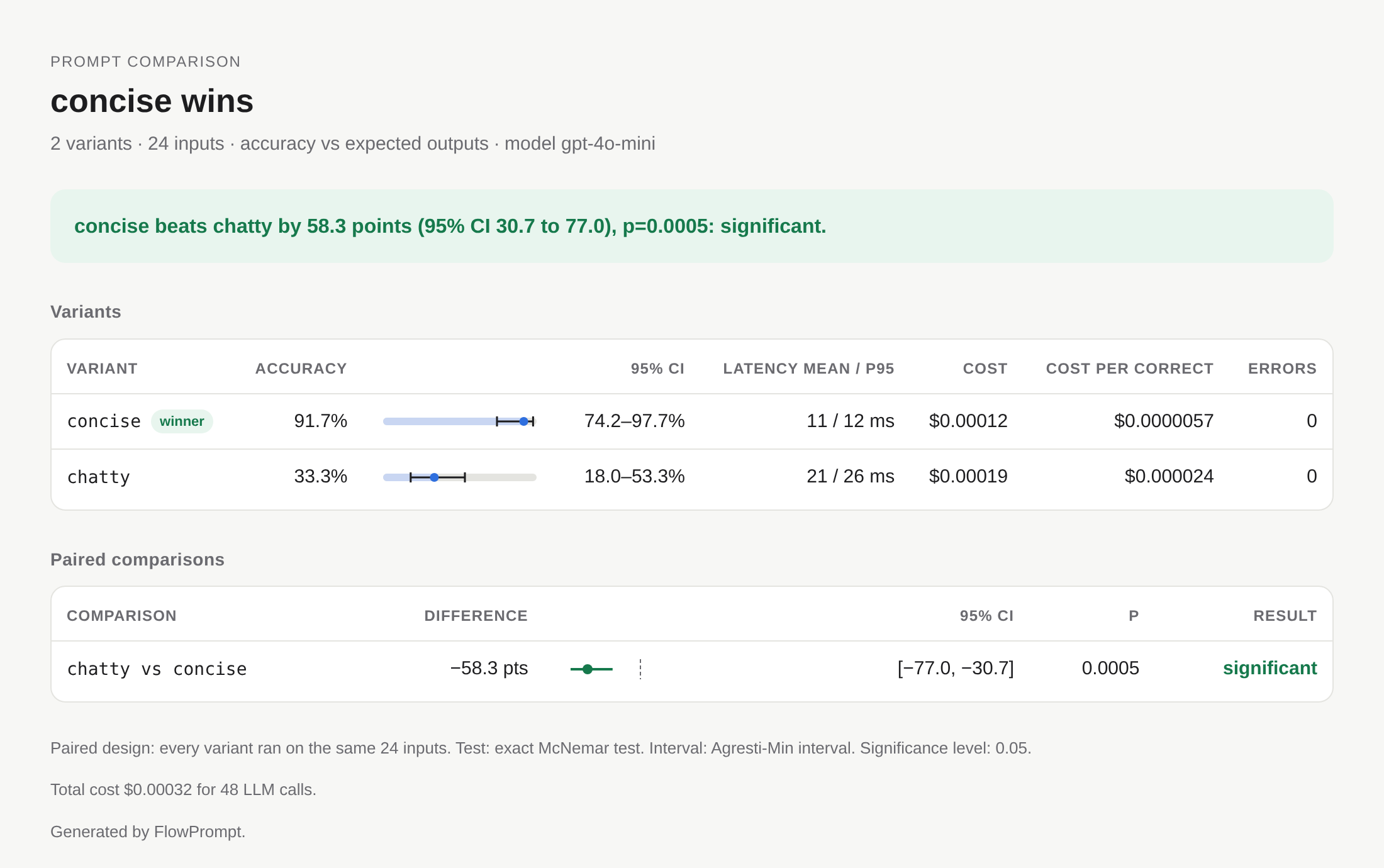
The same result renders as text, Markdown or a self-contained HTML page:
result.save_report("ab.html")  # light/dark, no external assets
result.save_report("ab.md")  # for pull requests and job summaries
result.save_report("ab.json")  # machine-readable
markdown = result.to_markdown()
How many inputs do you need?
from flowprompt import plan_sample_size

plan = plan_sample_size(0.10, discordance=0.2)  # detect 10 points
print(plan)
# To detect a 10-point difference at 80% power you need ~155 inputs (~310 calls)
The discordance (the share of inputs on which the two variants disagree)
matters as much as the difference: prompts that fail on the same hard
inputs disagree rarely and need fewer inputs. Estimate it with a small
pilot: result.sample_size_plan(0.10) reuses the discordance and cost per
call observed in a previous compare(), and the text report prints this
line automatically when there is no winner. Pass cost_per_call= or
model= with token counts to get a cost estimate.
Early stopping without inflating false positives
Checking a fixed-sample p-value after every batch and stopping at the first
p < 0.05 raises the false-positive rate well above 5%. If you want to
stop early, use a test built for continuous monitoring:
from flowprompt.testing import SequentialMcNemar

test = SequentialMcNemar(alpha=0.05)
for control_ok, treatment_ok in graded_pairs():  # one pair per input, in order
    if test.update(control_ok, treatment_ok):
        print(f"Stop: treatment differs after {test.n} inputs, p={test.p_value:.4f}")
        break
Its p-value stays valid however often you look (a Beta-mixture likelihood ratio martingale with Ville's inequality; see Statistical methods). The price is power: for a fixed sample size it needs more data than the one-look test.
Cost estimate before running
result = compare(variants, inputs, model="gpt-4o-mini", dry_run=True)
print(result)
# Comparison Results (DRY RUN)
# ========================================
#   Estimated cost: $0.03 for 200 calls
#   Per variant:
#     v1: 100 calls, ~5000 tokens, ~$0.01
#     v2: 100 calls, ~5200 tokens, ~$0.02
estimate_compare_cost() returns the same numbers as a dict. Prices come
from litellm's model price map; custom callables cannot be priced in
advance.
Pytest integration
The pytest plugin is discovered automatically:
import pytest


@pytest.mark.prompt_test
def test_new_prompt_is_not_worse(fp_compare):
    result = fp_compare(
        {"current": CurrentPrompt, "candidate": CandidatePrompt},
        inputs=inputs,
        expected=expected,
        eval_metric="exact",
        model="gpt-4o-mini",
    )
    result.assert_no_errors()
    assert result.winner != "current", result.verdict
fp_comparewrapscompare()and returns aPromptTestResult..assert_significant(threshold=0.05)uses the Holm-adjusted p-value when several variants were compared..assert_winner(name)and.assert_no_errors()fail with the variant breakdown and the verdict.fpis a session helper with.compare(),.acompare(),.estimate_cost().@pytest.mark.slow_promptmarks expensive tests; skip them withpytest --no-slow-prompts.
In tests, FakeLLM answers LLM calls offline (see
Prompt tests in CI).
Live traffic experiments
For production traffic splitting, sticky user assignment or multi-armed bandits, use the experiment runner. Here each request is served by one variant, so the variants see different inputs: the samples are independent and the unpaired tests below are the right tools.
from flowprompt import Prompt
from flowprompt.testing import create_simple_experiment
from pydantic import BaseModel


# Define your prompt variants
class PromptV1(Prompt):
    system = "You are a helpful assistant."
    user = "Process: {text}"

    class Output(BaseModel):
        result: str


class PromptV2(Prompt):
    system = "You are a helpful assistant. Be concise and clear."
    user = "Please process the following text: {text}"

    class Output(BaseModel):
        result: str


# Create experiment (automatically creates runner and registers prompts)
config, runner = create_simple_experiment(
    name="prompt_comparison",
    control_prompt=PromptV1,
    treatment_prompts=[("v2", PromptV2)],
    model="gpt-4o",
    min_samples=100,
)

# Start the experiment
runner.start_experiment(config.id)

# Run prompts for users
for user_id in range(100):
    # Get variant for this user
    variant = runner.get_variant(config.id, user_id=f"user{user_id}")

    # Run the prompt and record result
    result = runner.run_prompt(
        config.id, variant.name, input_data={"text": f"Sample text {user_id}"}
    )

# Get statistical summary
summary = runner.get_summary(config.id)
print(summary.summary_text())

# Check if there's a winner
if summary.winner:
    print(f"Winner: {summary.winner.name}")
    print(f"Effect size: {summary.statistical_result.effect_size:+.2%}")
Experiment Configuration
Creating Experiments
Define experiments with full control over variants and settings:
from flowprompt.testing import (
    ABTestRunner,
    ExperimentConfig,
    VariantConfig,
    AllocationStrategy,
)

# Create detailed experiment configuration
config = ExperimentConfig(
    name="prompt_optimization_test",
    description="Testing improved instruction clarity",
    variants=[
        VariantConfig(
            name="control",
            prompt_class="PromptV1",
            model="gpt-4o",
            temperature=0.0,
            is_control=True,
            weight=1.0,
        ),
        VariantConfig(
            name="treatment_a",
            prompt_class="PromptV2",
            model="gpt-4o",
            temperature=0.0,
            weight=1.0,
        ),
        VariantConfig(
            name="treatment_b",
            prompt_class="PromptV3",
            model="gpt-4o",
            temperature=0.3,
            weight=0.5,  # Less traffic
        ),
    ],
    allocation_strategy=AllocationStrategy.RANDOM,
    min_samples=100,
    max_samples=1000,
    confidence_level=0.95,
    metric="success_rate",
)

# Create runner and register prompts
runner = ABTestRunner()
runner.register_prompt("PromptV1", PromptV1)
runner.register_prompt("PromptV2", PromptV2)
runner.register_prompt("PromptV3", PromptV3)

# Create and start experiment
runner.create_experiment(config)
runner.start_experiment(config.id)
Configuration Options
ExperimentConfig:
- name: Human-readable experiment name
- description: What you're testing
- variants: List of variant configurations
- allocation_strategy: How to distribute traffic
- min_samples: Minimum samples before statistical analysis
- max_samples: Auto-complete experiment after this many samples
- confidence_level: Required confidence level (default 0.95)
- metric: Primary metric to optimize ("success_rate", "mean_metric")
VariantConfig:
- name: Variant identifier
- prompt_class: Name of registered prompt class
- model: Model to use for this variant
- temperature: Temperature setting
- weight: Traffic weight (for weighted allocation)
- is_control: Mark as control/baseline variant
- metadata: Additional configuration
Loading from YAML
Store experiment configurations in YAML files:
# experiment.yaml
name: prompt_comparison
description: Testing instruction improvements
variants:
  - name: control
    prompt_class: PromptV1
    model: gpt-4o
    temperature: 0.0
    is_control: true
    weight: 1.0
  - name: treatment
    prompt_class: PromptV2
    model: gpt-4o
    temperature: 0.0
    weight: 1.0
allocation_strategy: random
min_samples: 100
confidence_level: 0.95
Load and use:
Traffic Allocation
FlowPrompt supports multiple traffic allocation strategies:
Random Allocation
Random assignment with optional user stickiness (same user always gets same variant).
config = ExperimentConfig(
    name="random_test", variants=[...], allocation_strategy=AllocationStrategy.RANDOM
)

# Sticky by default - same user_id always gets same variant
variant = runner.get_variant(config.id, user_id="user123")
Round Robin
Equal distribution by cycling through variants.
config = ExperimentConfig(
    name="roundrobin_test",
    variants=[...],
    allocation_strategy=AllocationStrategy.ROUND_ROBIN,
)
Weighted Allocation
Distribute traffic according to variant weights.
config = ExperimentConfig(
    name="weighted_test",
    variants=[
        VariantConfig(name="control", ..., weight=2.0),    # 50% traffic
        VariantConfig(name="treatment_a", ..., weight=1.0), # 25% traffic
        VariantConfig(name="treatment_b", ..., weight=1.0), # 25% traffic
    ],
    allocation_strategy=AllocationStrategy.WEIGHTED
)
Multi-Armed Bandits
Adaptive allocation strategies that learn which variants perform better:
Epsilon-Greedy
Explores with probability epsilon, exploits (best variant) otherwise.
config = ExperimentConfig(
    name="epsilon_greedy_test",
    variants=[...],
    allocation_strategy=AllocationStrategy.EPSILON_GREEDY,
)

# Epsilon decays over time, balancing exploration and exploitation
UCB (Upper Confidence Bound)
Balances exploration and exploitation using confidence bounds.
config = ExperimentConfig(
    name="ucb_test", variants=[...], allocation_strategy=AllocationStrategy.UCB
)

# Allocates more traffic to promising variants while maintaining exploration
Thompson Sampling
Bayesian approach using Beta distributions.
config = ExperimentConfig(
    name="thompson_test",
    variants=[...],
    allocation_strategy=AllocationStrategy.THOMPSON_SAMPLING,
)

# Samples from posterior distributions to balance exploration/exploitation
Running Experiments
Basic Usage
# Get variant for a request
variant = runner.get_variant(
    experiment_id=config.id,
    user_id="user123",  # Optional, for sticky assignment
    context={"location": "US"},  # Optional context
)

# Run the prompt
result = runner.run_prompt(
    experiment_id=config.id,
    variant_name=variant.name,
    input_data={"text": "Sample input"},
    model="gpt-4o",  # Optional override
    success_fn=lambda output: len(output.result) > 0,  # Custom success check
    metric_fn=lambda output: len(output.result) / 100,  # Custom metric
)
Custom Success and Metric Functions
Define what "success" means for your use case:
def is_successful(output):
    """Custom success criteria."""
    return (
        output.result is not None
        and len(output.result) > 10
        and "error" not in output.result.lower()
    )


def compute_metric(output):
    """Custom metric computation."""
    if output.result is None:
        return 0.0
    # Score based on length and quality
    length_score = min(len(output.result) / 200, 1.0)
    quality_score = 1.0 if "excellent" in output.result else 0.5
    return (length_score + quality_score) / 2


result = runner.run_prompt(
    config.id,
    variant.name,
    input_data={"text": "input"},
    success_fn=is_successful,
    metric_fn=compute_metric,
)
Recording External Results
If you run prompts outside the runner, record results manually:
# Run prompt yourself
prompt = PromptV1(text="sample")
output = prompt.run(model="gpt-4o")

# Record the result
runner.record_result(
    experiment_id=config.id,
    variant_name="control",
    output=output,
    input_data={"text": "sample"},
    success=True,
    metric_value=0.85,
    latency_ms=250.0,
    cost_usd=0.0015,
    user_id="user123",
)
Experiment Lifecycle
# Start experiment
runner.start_experiment(config.id)

# Pause if needed
runner.pause_experiment(config.id)

# Resume (start again)
runner.start_experiment(config.id)

# Complete manually
runner.complete_experiment(config.id, winner="treatment")

# Auto-completion happens when:
# - max_samples is reached, or
# - a variant is significantly better once min_samples is reached.
#   This check runs after every result, which is a form of peeking:
#   set min_samples to your planned sample size (see below).
Statistical Analysis
Getting Results
# Get comprehensive summary
summary = runner.get_summary(
    experiment_id=config.id,
    test_type="z_test",  # or "chi_squared", "t_test", "bayesian"
)

# Access results
print(summary.to_dict())
print(summary.summary_text())
Statistical Tests
The runner compares each treatment with the control using an unpaired test (variants receive different requests). With several treatments the p-values are Holm-adjusted, and the winner is the variant with the largest significant positive difference.
Two-Proportion Z-Test (Default)
Best for comparing conversion/success rates:
summary = runner.get_summary(config.id, test_type="z_test")

if summary.statistical_result:
    print(f"P-value: {summary.statistical_result.p_value:.4f}")
    print(f"Significant: {summary.statistical_result.significant}")
    print(f"Difference: {summary.statistical_result.difference:+.3f}")
effect_size is the relative lift for these tests; difference is the
absolute difference in success rate.
Chi-Squared Test
Tests independence of success/failure and variant:
T-Test for Means
Compares mean metric values:
Bayesian A/B Test
Provides probability that treatment is better:
summary = runner.get_summary(config.id, test_type="bayesian")

if summary.statistical_result:
    details = summary.statistical_result.details
    print(f"P(treatment better): {details['prob_treatment_better']:.2%}")
    print(f"Expected lift: {details['expected_lift']:+.2%}")
    print(f"95% CI: [{details['ci_lower']:+.2%}, {details['ci_upper']:+.2%}]")
Interpreting Results
summary = runner.get_summary(config.id)

# Check status
print(f"Status: {summary.status.value}")
print(f"Total samples: {summary.total_samples}")

# Variant performance
for name, stats in summary.variant_stats.items():
    print(f"\n{name}:")
    print(f"  Samples: {stats.samples}")
    print(f"  Success rate: {stats.success_rate:.2%}")
    print(f"  Mean metric: {stats.mean_metric:.4f}")
    print(f"  Latency: {stats.mean_latency_ms:.1f}ms")
    print(f"  Cost: ${stats.total_cost_usd:.4f}")
    print(
        f"  95% CI: [{stats.confidence_interval[0]:.2%}, "
        f"{stats.confidence_interval[1]:.2%}]"
    )

# Statistical significance
if summary.statistical_result:
    result = summary.statistical_result
    print(f"\nStatistical Analysis:")
    print(f"  Test: {result.test_name}")
    print(f"  P-value: {result.p_value:.4f}")
    print(f"  Significant: {'Yes' if result.significant else 'No'}")
    print(f"  Effect size: {result.effect_size:+.2%}")

    if result.power:
        print(f"  Statistical power: {result.power:.2%}")

    if result.sample_size_recommendation:
        print(f"  Recommended sample size: {result.sample_size_recommendation}")

# Winner determination
if summary.winner:
    print(f"\nWinner: {summary.winner.name}")

# Recommendations
if summary.recommendations:
    print("\nRecommendations:")
    for rec in summary.recommendations:
        print(f"  - {rec}")
Viewing Raw Results
# Get all results for an experiment
results = runner._store.get_results(config.id)

# Get results for specific variant
control_results = runner._store.get_results(config.id, variant_name="control")

# Access individual result
for result in results[:5]:
    print(f"Variant: {result.variant_name}")
    print(f"Input: {result.input_data}")
    print(f"Output: {result.output}")
    print(f"Success: {result.success}")
    print(f"Metric: {result.metric_value}")
    print()
Best Practices
1. Define Clear Success Criteria
Before starting an experiment, define what success means:
def is_successful(output):
    """
    Success criteria:
    1. Output is not empty
    2. Contains required fields
    3. Passes validation
    """
    if not output.result:
        return False
    if len(output.result) < 10:
        return False
    if not validate_format(output.result):
        return False
    return True
2. Calculate Required Sample Size
Determine the sample size before starting. With independent samples (live
traffic), plan_sample_size with a baseline_accuracy assumes independent
errors, which gives approximately the per-variant sample size of the
two-proportion test:
from flowprompt import plan_sample_size

plan = plan_sample_size(0.05, baseline_accuracy=0.50)  # 50% -> 55%
per_variant = plan.n_inputs  # about 1,570

config = ExperimentConfig(
    name="my_test",
    variants=[...],
    min_samples=2 * per_variant,  # total across two variants
    confidence_level=0.95,
)
3. Use Sticky Assignment
Ensure consistent user experience:
# Good: Same user always gets same variant
variant = runner.get_variant(config.id, user_id=user.id)

# Bad: User might see different variants
variant = runner.get_variant(config.id)  # No user_id
4. Monitor Early and Often
Check experiment health regularly:
# Check every 100 samples
if summary.total_samples % 100 == 0:
    print(summary.summary_text())

    # Check for issues
    for name, stats in summary.variant_stats.items():
        if stats.samples < summary.total_samples * 0.2:
            print(f"Warning: {name} has low sample count")

        if stats.success_rate < 0.5:
            print(f"Warning: {name} has low success rate")
5. Consider Multiple Metrics
Don't optimize for success rate alone:
# Track multiple aspects
summary = runner.get_summary(config.id)

for name, stats in summary.variant_stats.items():
    # Success rate
    print(f"{name} success: {stats.success_rate:.2%}")

    # Quality (mean metric)
    print(f"{name} quality: {stats.mean_metric:.4f}")

    # Performance
    print(f"{name} latency: {stats.mean_latency_ms:.1f}ms")

    # Cost efficiency
    cost_per_success = (
        stats.total_cost_usd / stats.successes if stats.successes > 0 else 0
    )
    print(f"{name} cost/success: ${cost_per_success:.4f}")
6. Avoid Peeking
Every extra look at a fixed-sample p-value is another chance for noise to cross the threshold. Decide the sample size up front and evaluate once it is reached:
summary = runner.get_summary(config.id)

if summary.total_samples < config.min_samples:
    print("Warning: Not enough samples for reliable results")
    print(f"Current: {summary.total_samples}, Need: {config.min_samples}")
else:
    if summary.statistical_result.significant:
        print("Significant result detected!")
7. Use Persistence
Store experiment data for later analysis:
from flowprompt.testing import ExperimentStore

# Create persistent store
store = ExperimentStore(storage_path=".experiments")

# Create runner with store
runner = ABTestRunner(store=store)

# Data is automatically saved to disk
# Survives restarts and can be analyzed offline
8. Test One Thing at a Time
Isolate variables for clear conclusions:
# Good: Test instruction changes only
class Control(Prompt):
    system = "You are helpful."
    user = "Process: {text}"


class Treatment(Prompt):
    system = "You are helpful. Be concise."  # Only change
    user = "Process: {text}"


# Bad: Multiple changes
class Treatment(Prompt):
    system = "You are helpful. Be concise."  # Changed
    user = "Please process: {text}"  # Also changed
    # Can't tell which change caused the difference!
Advanced Usage
Multi-Variant Tests
Compare more than two variants:
config = ExperimentConfig(
    name="multi_variant_test",
    variants=[
        VariantConfig(name="control", ..., is_control=True),
        VariantConfig(name="treatment_a", ...),
        VariantConfig(name="treatment_b", ...),
        VariantConfig(name="treatment_c", ...),
    ],
    min_samples=200  # 50 per variant minimum
)

# Each treatment is compared to the control; p-values are Holm-adjusted.
summary = runner.get_summary(config.id)
# Winner: the treatment with the largest significant improvement
# (or the control, if it is significantly better than every treatment).
Sequential Testing
Stopping a live experiment the first time get_summary() reports
significance inflates the false-positive rate, because the fixed-sample
test is applied again and again. Prefer a fixed horizon (min_samples set
to the planned size, or max_samples). For paired offline evaluations,
SequentialMcNemar gives an always-valid test that you may check after
every input (see Early stopping).
An always-valid test for live, unpaired traffic is planned.
Custom Allocators
Implement custom allocation logic:
from flowprompt.testing.allocation import TrafficAllocator


class CustomAllocator(TrafficAllocator):
    def allocate(self, experiment, user_id=None, context=None):
        # Your custom logic
        if context and context.get("premium_user"):
            return experiment.variants[0]  # Premium users get best variant
        else:
            return random.choice(experiment.variants)

    def update(self, experiment_id, variant_name, stats):
        # Update allocator state based on results
        pass


# Use custom allocator
runner._allocators[config.id] = CustomAllocator()
Integration with Monitoring
Export metrics to your monitoring system:
import time

while experiment_running:
    summary = runner.get_summary(config.id)

    # Export to monitoring (e.g., Prometheus, DataDog)
    for name, stats in summary.variant_stats.items():
        metrics.gauge(f"experiment.{config.id}.{name}.success_rate", stats.success_rate)
        metrics.gauge(f"experiment.{config.id}.{name}.latency", stats.mean_latency_ms)
        metrics.gauge(f"experiment.{config.id}.{name}.samples", stats.samples)

    time.sleep(60)  # Update every minute
Next Steps
- Learn about Optimization to improve prompts before A/B testing
- Check the API Reference for detailed documentation
- Read Statistical methods for the tests behind
compare() - See the examples for runnable scripts