Badges & share cards
Two ways to show a result: a small badge for a README, and a 1200x630 card for a README, a blog post or a social network. Both are generated locally from a scan report. Nothing is uploaded anywhere.
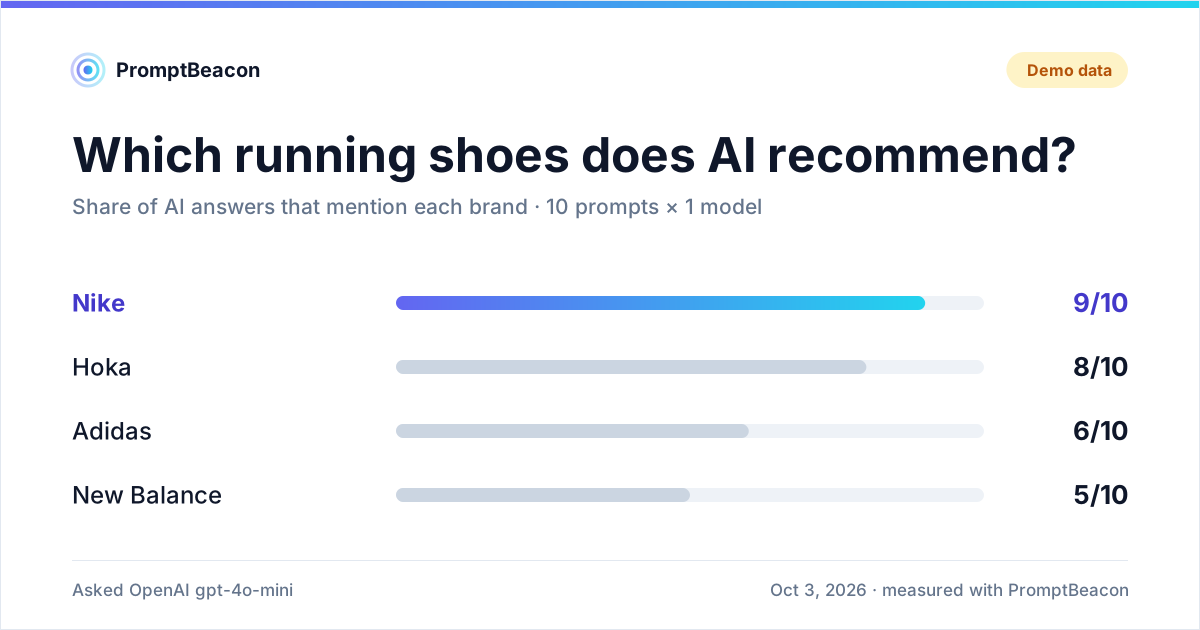
Scan once, render many
Every output can be produced from one saved report, so you pay for the scan once:
promptbeacon scan "Nike" -t "running shoes" -c "Adidas" -c "New Balance" \
  -f json --no-save > report.json

promptbeacon badge --report report.json -o .promptbeacon/badge.svg \
  --endpoint .promptbeacon/badge.json
promptbeacon card --report report.json -o .promptbeacon/card.svg --theme both
badge and card can also run the scan themselves, with the same options as scan
(including --repo, --pypi, --npm and --demo):
promptbeacon card "Nike" -t "running shoes" -c "Adidas" -c "Hoka" --demo
promptbeacon badge --pypi httpx
Badge

The badge shows the visibility score and share of voice (--metric both, the
default), or only one of them (--metric score, --metric sov). Its color follows the
score: green from 70, amber from 40, red below. A badge made from demo data reads
AI visibility · demo and is grey.
There are two ways to put it in a README.
Commit the SVG (no third-party service):
[](https://github.com/yotambraun/promptbeacon)
Use shields.io, which renders a badge from a small JSON file
(endpoint badge). --endpoint writes that
file; commit it and point shields.io at its raw URL, URL-encoded:
[](https://github.com/yotambraun/promptbeacon)
The JSON follows the endpoint schema: schemaVersion (always 1), label, message,
and optional color, labelColor and logoSvg:
{
  "schemaVersion": 1,
  "label": "AI visibility",
  "message": "62/100 · SoV 34%",
  "color": "b45309",
  "labelColor": "1e293b",
  "logoSvg": "<svg …>"
}
shields.io caches endpoint badges, so a refreshed file can take a few minutes to show.
In Python:
from promptbeacon import Beacon
from promptbeacon.share import badge_endpoint, render_badge_svg, shields_url

report = (
    Beacon("Nike")
    .demo()
    .with_category("running shoes")
    .with_competitors("Adidas")
    .scan()
)
svg = render_badge_svg(report)
endpoint = badge_endpoint(report, metric="both")
url = shields_url(
    "https://raw.githubusercontent.com/OWNER/REPO/main/.promptbeacon/badge.json"
)
Share card
The card answers one question: in how many answers does each brand appear? It shows up to six brands (yours is always included and highlighted), the category, how many prompts and models were used, the date, and how the scan was measured (Demo data, Base model or Web-grounded).
It is designed to stay readable with long names, many competitors, non-Latin text and extreme values. It uses system fonts and no scripts, so it renders the same in a README, a docs page or a browser.
Light and dark
--theme both writes card.svg and card-dark.svg. GitHub picks the right one with a
<picture> element:
<picture>
  <source media="(prefers-color-scheme: dark)" srcset=".promptbeacon/card-dark.svg">
  <img alt="Which running shoes does AI recommend?" src=".promptbeacon/card.svg" width="600">
</picture>
PNG for social networks
X, LinkedIn, Slack and Discord do not accept SVG uploads or previews. Add --png for
a 2400x1260 PNG (crisp on high-density screens):
pip install 'promptbeacon[share]'     # adds Pillow
promptbeacon card --report report.json --png card.png
The PNG uses fonts installed on the machine. For Chinese, Japanese or Korean names, have a CJK font installed (for example Noto Sans CJK).
from promptbeacon.share import render_card_png, render_card_svg

svg = render_card_svg(report, theme="dark")
png = render_card_png(report, theme="light")  # bytes; needs promptbeacon[share]
Keep it current
A badge is only useful if it is fresh. The weekly workflow template scans on a schedule and commits the badge, its JSON and the card back to the repository:
- uses: yotambraun/promptbeacon@v1
  with:
    brand: "Your Product"
    category: "your category"
    competitors: |
      Competitor One
      Competitor Two
    badge-path: .promptbeacon/badge.svg
    badge-endpoint-path: .promptbeacon/badge.json
    card-path: .promptbeacon/card.svg
  env:
    OPENAI_API_KEY: ${{ secrets.OPENAI_API_KEY }}
The full template, including the commit step and permissions: contents: write, is
examples/workflows/ai-visibility-weekly.yml.
See CI & examples for the Action's inputs and outputs.
Honest labels
Badges and cards made from demo data always say so. Scores from a base-model scan reflect the model's training memory; web-grounded scans reflect provider web search, which approximates but does not equal the consumer apps.