Quickstart
Keys, one command, an open report. Five minutes.
Five minutes, one command, and you are holding a report you can open, email or put in a ticket. No account, no database, no install - the command runs from npm and writes three files into a folder you choose. Everything it spends goes straight to your own provider account.
Get two keys (two minutes)
Saylent runs on your own provider keys. Nothing goes through us.
- OpenAI - platform.openai.com/api-keys. Starts with
sk-. - Anthropic - console.anthropic.com. Starts with
sk-ant-.
One of the two is enough to run an audit. With only one, that provider's model
family judges every answer (judge_mode: single-family) and the report says
so in its header and its band. With both, judging is cross-family: an OpenAI
answer is judged by the Anthropic model and vice versa, which controls for a
model preferring its own output.
Optional, for two more answer engines:
- Gemini - aistudio.google.com/apikey. Free tier answers unreliably; turn on billing for a real run.
- Perplexity - www.perplexity.ai/settings/api.
The simplest way to store them, on every operating system, is the CLI's own
key store - it masks the key as you type, tests it with a free call, and saves
it to ~/.saylent/config.json with owner-only permissions, so you never enter
it again:
npx saylent keys set openai
npx saylent keys set anthropic
npx saylent keys test
You can also put them in the environment, or in a .env file in the folder
you'll run from (OPENAI_API_KEY=sk-..., one per line). The environment form
differs per shell:
# macOS / Linux (bash, zsh)
export OPENAI_API_KEY=sk-...
export ANTHROPIC_API_KEY=sk-ant-...
# Windows PowerShell
$env:OPENAI_API_KEY="sk-..."
$env:ANTHROPIC_API_KEY="sk-ant-...":: Windows cmd.exe
set OPENAI_API_KEY=sk-...
set ANTHROPIC_API_KEY=sk-ant-...Keys resolve in that order - environment variable → .env in the current
folder → ~/.saylent/config.json - first match wins per provider.
No keys ready yet? Run npx saylent audit <domain> anyway - on a real
terminal it prompts for each one, the same way saylent keys set does.
Run it
npx saylent audit example.comThis prints what it's about to spend before it spends anything. Pasted
straight from a real run (OPENAI_API_KEY=... ANTHROPIC_API_KEY=... npx saylent audit example.com --dry-run, which prints this same preflight block
before exiting at $0):
Saylent · audit · example.com

  Keys      OpenAI ✓   Anthropic ✓   Gemini –   Perplexity –
  Engines   chatgpt, claude   (add GEMINI_API_KEY / PERPLEXITY_API_KEY for 4 engines)
  Judge     cross-family (OpenAI ↔ Anthropic)  ·  claude-haiku-4-5 / gpt-5-mini
  Profile   smoke · 6 questions · 2 engines · est. $0.40–$0.60 of your credits
  Output    example.com/2026-09-09/  (run.json · report.html · report.md)
  Sampling  1x scored questions (profile default)

  Run it? [Y/n]
Say yes (or pass --yes to skip the prompt) and it narrates the run stage by
stage - a number, a label, a short detail, and the real elapsed time on each
line. While 04 engines is running, a terminal gets one live line repainted in
place with the per-engine draw count, the elapsed time and the cost so far; a
log file or CI gets that same line written out at intervals instead, so a build
log is not four hundred near-identical rows. That count is how many draws were
sent, not how many succeeded - a provider that errors on every draw still
reaches N/N there; a failed engine gets its own line once the run finishes,
never a silent drop. The code never prints a checkmark on this line.
The block below replays a real recorded run of the command below, with all
four engines configured: every number is read from that run's own run.json
and printed in the CLI's current output format, so it matches what you will
see today. saylent-kestrel.vercel.app is our own fictional
sample site (the brand is called Kestrel Uptime) - the one domain on this site
we are allowed to publish findings about. Everywhere else, example.com
stands in for yours.
npx saylent audit saylent-kestrel.vercel.app --yes Run it? [Y/n] y
01 crawl saylent-kestrel.vercel.app
02 brand model Kestrel Uptime
03 questions template v2 · 23 frozen · smoke asks 6
04 engines chatgpt 6/6 · claude 6/6 · gemini 6/6 · perplexity 6/6
05 judge 24 draws
06 cited pages 24 answers · 204 citations · 11 pages fetched
07 site gates saylent-kestrel.vercel.app · 23 checks
08 fix plan 8 fixes drafted
09 score share of voice · confidence band
perplexity 5/6 · Perplexity rate-limited this run — common on a brand-new key. Retrying with backoff; lower `--samples` or wait a minute. · continuing
Verdict Mentioned in 0 of 11 answers. Recommended in 0 of 11.
Band recommended 0 of 11
Report saylent-kestrel.vercel.app/2026-09-10/report.html
Verify npx saylent verify saylent-kestrel.vercel.app/2026-09-10/run.json (after you ship fixes)
Total 3m 45s · $1.11Where those numbers come from: the run froze the full 23-question set, and
the smoke profile asked 6 of them - 6 questions × 4 engines = the 24
draws the judge scored. Only category and problem questions count toward
the band, and three of the six were of those types, so 12 of the 24 draws were
scored - 11 of which came back with an answer (one Perplexity 429 accounts
for the missing one, and it got its own line). That is the "of 11" in the
verdict: scored answers actually received, never a denominator padded with
draws that failed.
The same run, moving - the frames are drawn from that run's own run.json,
not typed by hand:
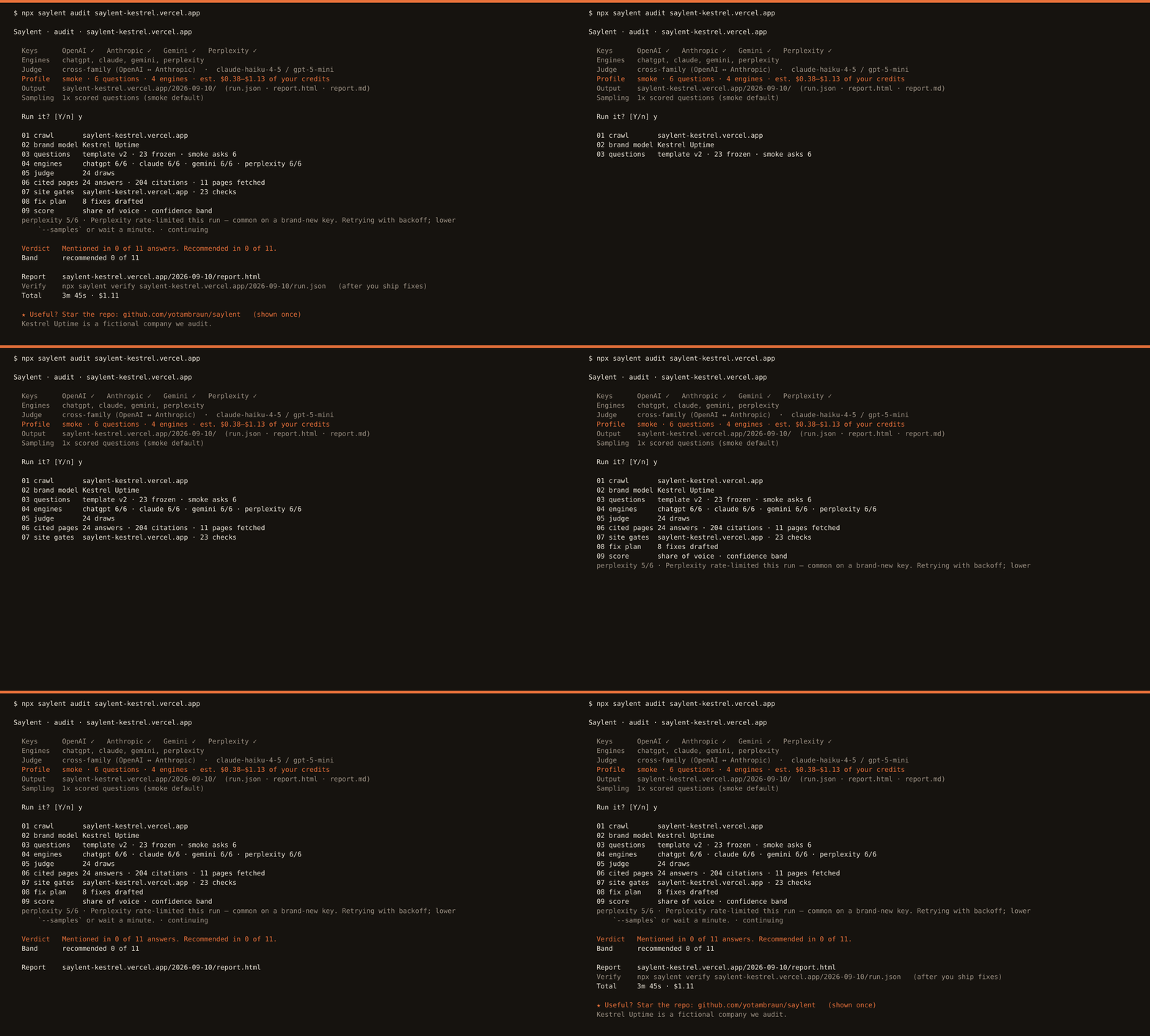
Open report.html - it opens straight from disk, no server, dark or light
by your system theme.
What you get
Three files in the output directory:
report.html- the full report, self-contained (no CDN, no tracking, under 1.5 MB). Verdict, every answer per engine with its date, the pages the engines cited, whether AI bots can read your site, and drafted fixes. Drop it in Slack or email; it looks the same everywhere.report.md- the same content as Markdown, for a ticket or an LLM context window.run.json- the lossless run bundle: every raw answer, every sampled draw, every citation, the resolved model per role, the cost. This is the input tosaylent verify,saylent report, andsaylent history.
What it costs
smoke (the default) asks 6 questions across your available engines: with all
four, roughly $0.60 to $1.20, and our two recorded runs cost $0.93 and
$1.11. --profile full asks 23 questions across up to 4 engines, roughly
$3.70 to $5.50 with four. Fewer engines cost less, and the CLI prints the
estimate for the engines you actually have, then requires you to confirm it,
before it spends a cent.
A local ledger at ~/.saylent/spend.json tracks what you've actually spent
today and refuses to start a run that would push you over
DAILY_SPEND_CAP_USD (default $20) or a --max-usd you pass. Preview a run
for $0 with --dry-run: it prints the same preflight block and estimate,
sends nothing to any provider, and exits.
See What it costs for the full breakdown and What gets sent to providers for exactly what leaves your machine.
Next steps
- Read the report. Reading a report walks through every section, in the order the page puts them.
- Change what it asks. Questions and models is how to add, remove and retag a question, ask it more than once, and choose the model behind each role.
- Ship a fix, then check it moved. Verify and history re-asks the same frozen questions and shows the movement, with an honest band instead of a fake-precise number.
- Keep checking, without babysitting a terminal.
Check again next month puts
saylent verifyon a cron entry or a scheduled GitHub Actions job. - Every command and flag: the CLI reference.
- Being crawled, or crawling someone. The Saylent crawler is what the audit reads from a site, how it identifies itself, and how to allow or block it.
- Want history, more than one person, and scheduled runs? Deploy the app, or walk a read-only copy of it first.