Deploy the app
The full app on infrastructure you own, start to finish.
The CLI is one audit, one folder, no login. The full app adds accounts, stored history, scheduled verifies, multiple users on one deployment, share links, and an admin console with spend controls - all on infrastructure you own. Everything below is Postgres you control (see Your data is plain Postgres) plus a job runner for the audit pipeline; there's no hosted Saylent service in between.
Same product loop everywhere: onboarding (brand + domain) → a run with live progress → the report → a fixes tracker → verify → compare against a rival → a share link → settings. The three targets below only differ in where steps 1 and 5 happen - pick the one that matches how much you want to manage.
Pick where it runs
| On my laptop | On my own server | In the cloud | |
|---|---|---|---|
| What it needs | Docker Desktop | Docker Engine + a domain | A Vercel account |
| Time | ~10 minutes | ~20 minutes | ~5 minutes |
| Data lives | Local Postgres on disk | Your server (hosted or self-hosted Supabase) | Your Supabase project |
| You manage | Nothing - stop the containers when done | Backups, TLS, upgrades | Nothing - Vercel + Supabase host it |
| Guide | Run it on your laptop | Self-host on your server | Deploy to the cloud |
Every target applies the same migrations (npm run db:migrate), reads
the same environment tiers, exposes the same
/api/health, and gives the operator role to whoever signs up first.
First sign-up is the operator
There's no separate admin setup step. The first account created on a fresh
database becomes the operator (migration 0040) - a trigger, not a manual
step. The onboarding shows that account one extra card: "You are the
operator. Budget controls and the admin console are in the sidebar." Every
account after that is a normal user; nothing else about their experience
differs. If you ever need a second admin later, run
scripts/grant-admin.ts.
Everything that account can then do is in The operator console.
Users and access
Anyone who can reach your /login page can create an account: there is no
invite code and no allowlist in the app. Users and access
is who can sign up, the three ways to limit that, how a teammate joins, what a
normal user can and cannot do next to an operator, and the per-account brand
limit.
Control the questions and the run in the app
The CLI lets you look at the buyer questions before you pay for them
(saylent questions), edit the file, and then pick samples, engines,
language and skipped stages on the saylent audit command line. The app
gives you the same control, per brand, at
/app/brand/<id>/questions - reachable from the "Questions and run
options" link on a brand's movement page.
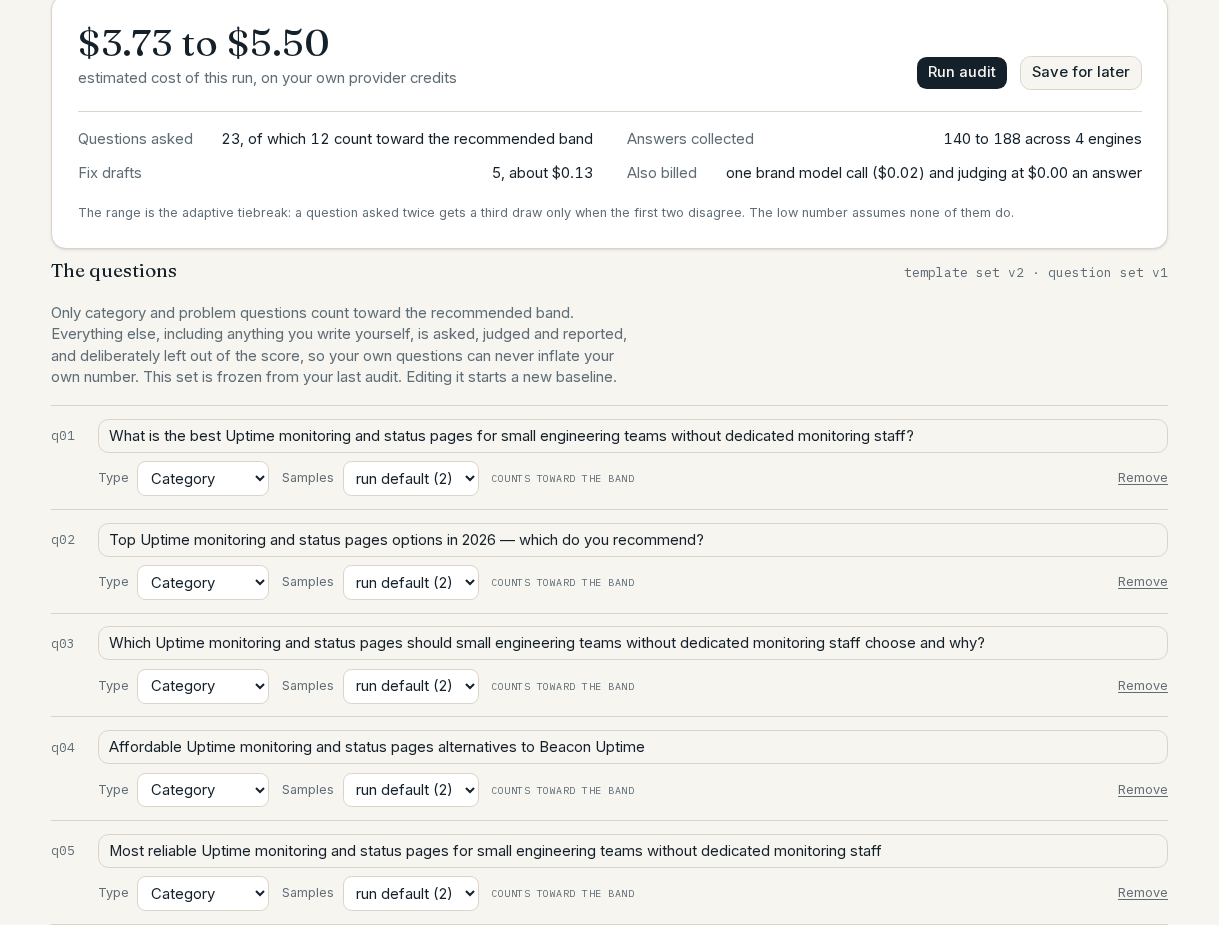

The page shows the exact set the run will freeze, generated from the brand model you already have, so opening it costs nothing. From there you can:
- edit, add, remove and retag any question. Only
categoryandproblemrows count toward the recommended band; anything you write is tagged as yours and asked, judged and reported without touching the score. - set samples per question and per run (1-5), the same as
--samplesplus a per-row override inquestions.json. - narrow the answer engines (at least two, so the verdict is still
cross-checked) and choose a language, the same as
--enginesand--locale. A language is applied once, before the set freezes, so every later verify asks the same wording; it has no effect while you have edited rows, because your wording is asked exactly as written. - skip stages: the fix drafts (the only skip that saves money), the page-by-page corpus, and the crawler gate checks. Each says what you give up.
The estimated cost, and the arithmetic behind it, sits above the Run button: how many questions, how many of them are scored, how many answers that is across your engines, and what the brand model, judging and fix drafts add. Nothing is spent until you press it.
Changing what gets asked starts a new baseline. Verify compares a run against the frozen set it was baselined on, so editing the questions or the engine set clears that frozen set and bumps its version - the same visible re-baseline that editing a brand's category or competitors already causes. The page says so before you run, and your existing reports are untouched.
The choices are stored on the brand (brands.run_options) and stamped onto
each run (runs.run_options), so a finished run always records what it was
told to do.
Budget controls
The sidebar's "Budget & limits" (operator-only) holds: a daily spend cap in
USD (default $20, DAILY_SPEND_CAP_USD), per-brand run throttles (default 3
audits and 3 verifies per rolling 24-hour window, RUN_THROTTLE_*), a kill
switch that refuses every new run the moment you press it, run health, the
support inbox, takedown requests, and a "Test providers" button that checks
your configured keys with a free call. There are no prices anywhere in a
self-hosted deployment - /app/settings/limits shows each user "your limits,
set by your operator."
Page by page: The operator console.
Full reference: Configuration.
By default, the weekly verify and monthly audit crons are off - they
spend your keys' money on a schedule you didn't explicitly ask for. Set
FLAG_SCHEDULED_RUNS=1 and redeploy when you're comfortable with the cost:
every brand with one completed audit then gets a weekly verify and a
monthly audit, staggered to each owner's local 09:00.
Why a job runner? (Inngest)
The audit pipeline is nine stages - crawl, brand model, questions, four
engines, judge, cited pages, site checks, fixes, score - each of which can
individually fail, retry, or take longer than a typical web request allows.
Inngest turns each stage into one durable, retried, individually-resumable
step instead of one long function that has to restart from the top on any
failure. Running it locally (npx inngest-cli dev, no account or keys
needed) starts a dev server that shows you every step live; npm run app:local starts it for you alongside the app.
Your data is plain Postgres
Every self-hosted deployment's database is a normal Postgres database on
your own Supabase project or your own Supabase self-host - open to psql,
DBeaver, pgAdmin, pg_dump, or any other Postgres client, and yours to back
up, migrate, or move however you like. Supabase is the login, row-level
permission, and live-update layer on top of that Postgres, not a different
database - plain Postgres with your own auth system is a much larger rewrite
(every row-level-security policy becomes application code, live progress
becomes polling) with no evidence it grows adoption faster, so it isn't
offered.
Want no database at all? The CLI is the answer: a folder
of run bundles is your history, and saylent verify on that folder is your
tracking.
Upgrades
npm run db:migrate is idempotent - safe to re-run on every deploy. Each
release lists the migrations and environment variables it adds; /api/health
compares the migrations your database has applied against what the running
code expects and shows a banner if any are missing.